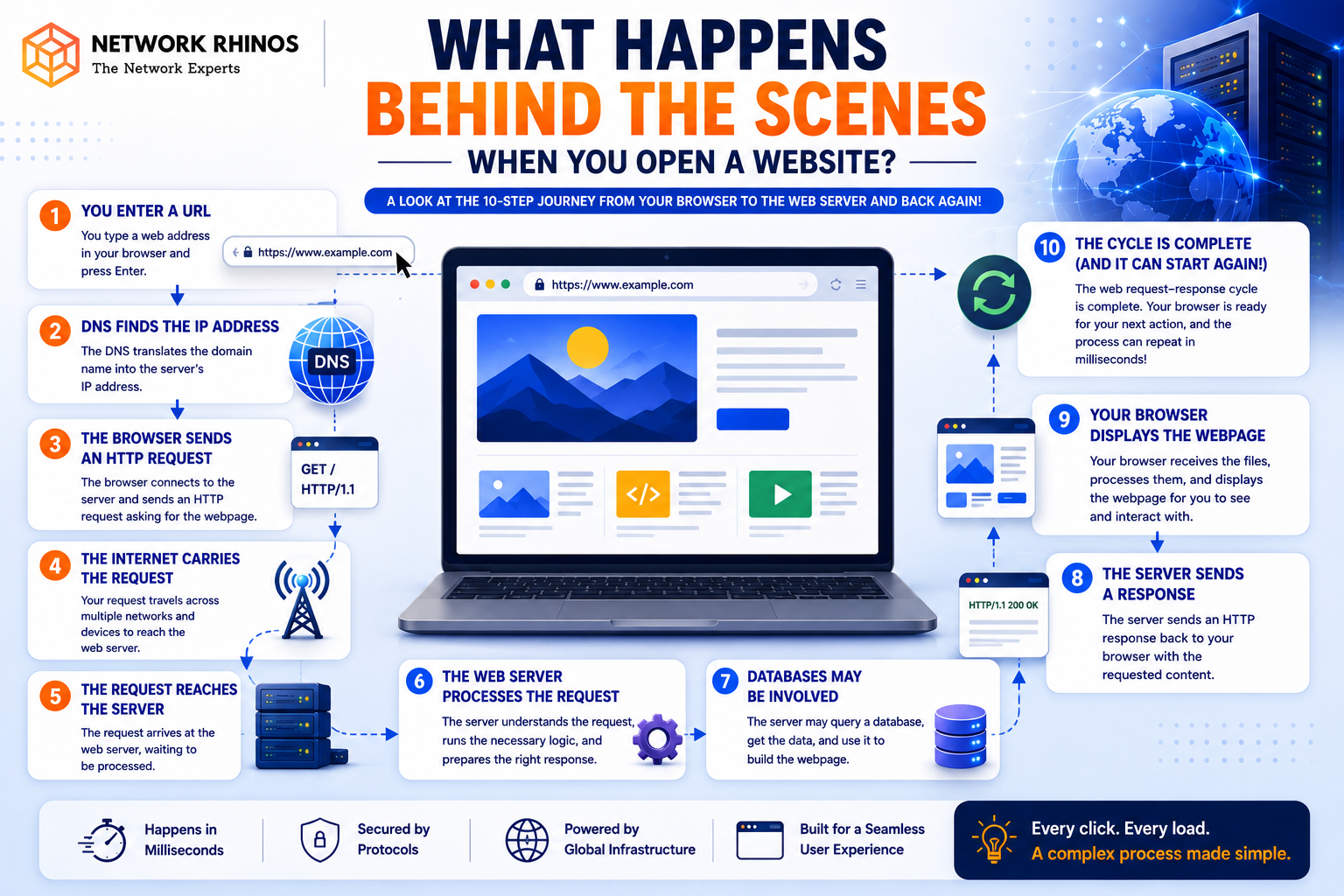
What Happens Behind the Scenes When You Open a Website?
Every day, we open dozens of websites without giving much thought to what happens in the background. Whether you’re checking social media, watching videos, shopping online, or reading articles, a complex process takes place within seconds to bring that webpage to your screen.
But have you ever wondered what actually happens when you type a website address into your browser and press Enter?
Understanding this process is not only interesting but also helps students build strong networking fundamentals. In fact, concepts like these are taught in every good CCNA Training Institute because they form the foundation of computer networking.
Let’s break down the entire process into simple steps.
Step 1: You Enter a Website Address
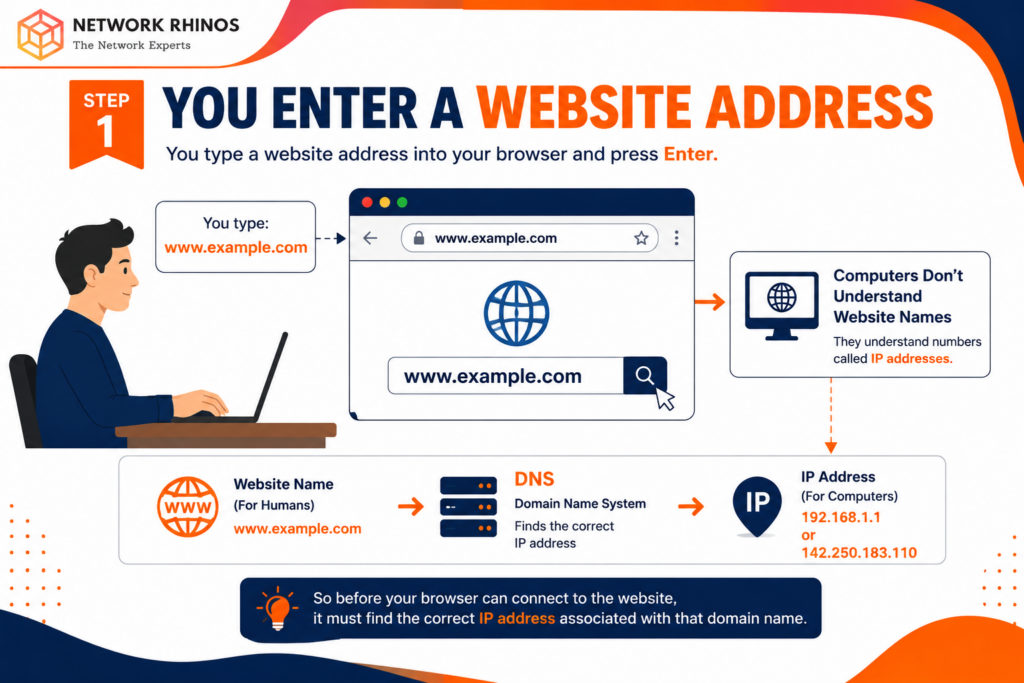
Imagine you type:
into your browser and press Enter.
At first glance, this looks simple. However, computers do not understand website names the way humans do. They communicate using IP addresses, which are numerical identifiers assigned to devices and servers on a network.
For example:
192.168.1.1
or
142.250.183.110
So before your browser can connect to the website, it must find the correct IP address associated with that domain name.
This is where DNS comes into play.
Step 2: DNS Finds the Website’s IP Address
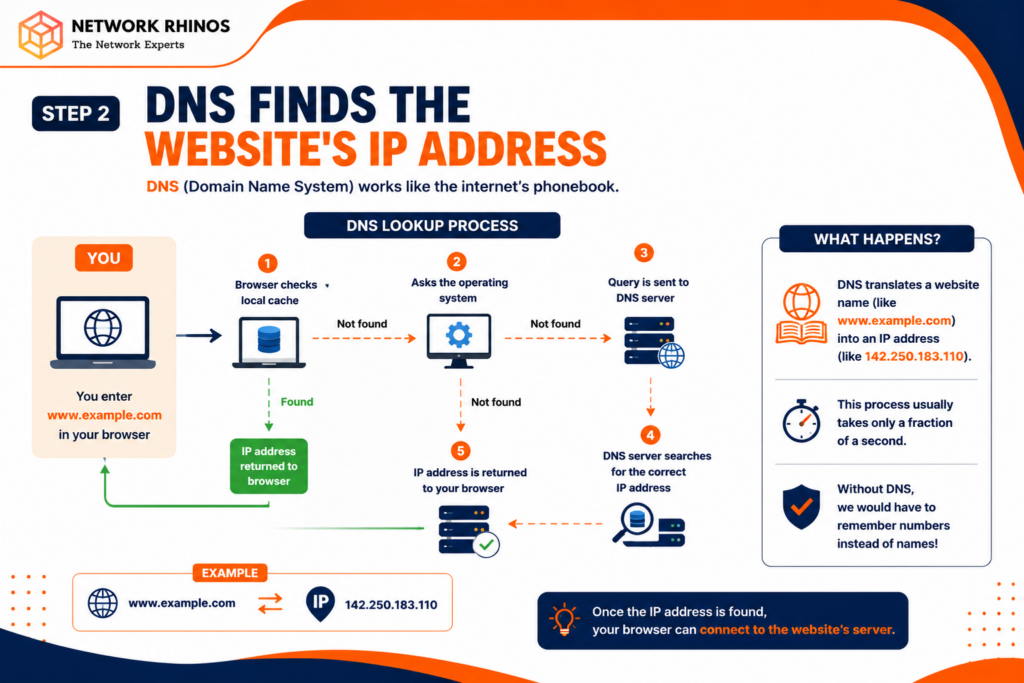
DNS stands for Domain Name System.
Think of DNS as the internet’s phonebook.
When you enter a website address:
- Your browser first checks its local cache.
- If the address is not found, it asks the operating system.
- If still unavailable, the request goes to a DNS server.
- The DNS server searches for the correct IP address.
- The IP address is returned to your browser.
Without DNS, we would have to memorize numerical IP addresses for every website we visit.
This DNS lookup process usually takes only a fraction of a second.
Step 3: Your Browser Creates a Connection
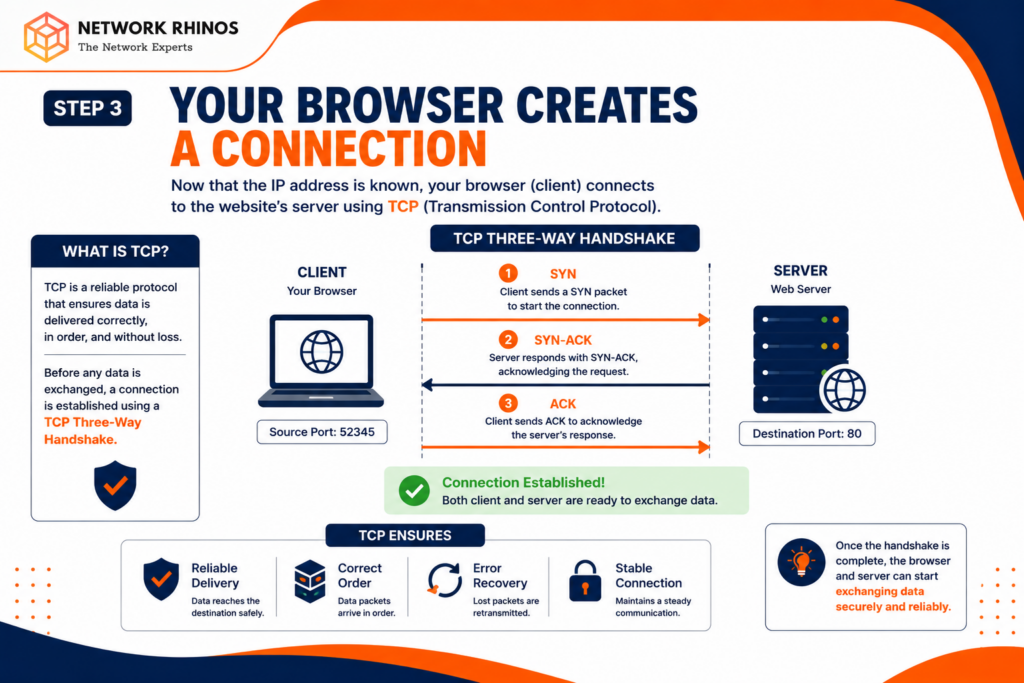
Now that the browser knows the website’s IP address, it needs to establish communication with the web server hosting the site.
This communication happens using TCP (Transmission Control Protocol).
TCP ensures that:
- Data arrives correctly.
- Data arrives in the correct order.
- Lost packets are retransmitted.
- Communication remains reliable.
A connection is established through a process called the TCP Three-Way Handshake.
The steps are:
- Client sends SYN.
- Server responds with SYN-ACK.
- Client sends ACK.
Once completed, both devices are ready to exchange information.
This concept is one of the first networking topics students learn at a CCNA Training Institute because it is essential for understanding internet communication.
Step 4: Secure Websites Start Encryption
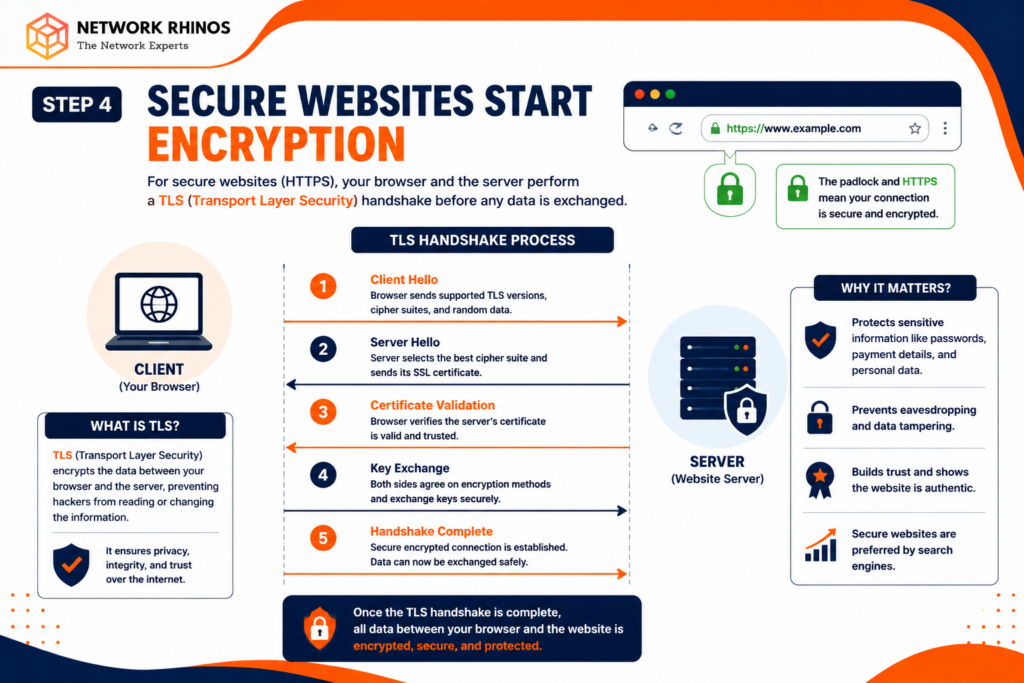
Today, most websites use HTTPS instead of HTTP.
The extra “S” stands for Secure.
Before exchanging information, the browser and server perform a TLS (Transport Layer Security) handshake.
During this process:
- Encryption methods are agreed upon.
- Security certificates are verified.
- Secure communication is established.
This prevents hackers from reading sensitive information such as:
- Passwords
- Banking details
- Personal information
- Credit card data
Whenever you see a padlock icon in your browser, HTTPS is protecting your connection.
Step 5: Browser Sends the Request
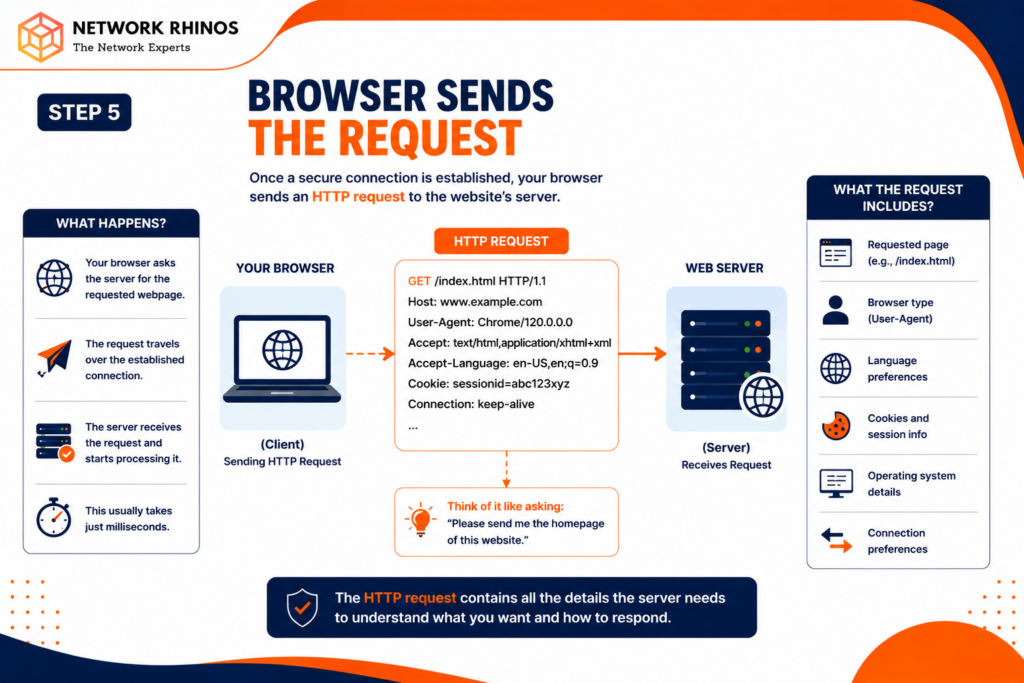
Once the connection is established, the browser sends an HTTP request to the server.
The request may look something like this:
“Please send me the homepage of this website.”
The request includes information such as:
- Browser type
- Operating system
- Requested webpage
- Language preferences
- Cookies and session information
The server receives this request and begins processing it.
Step 6: The Web Server Processes the Request
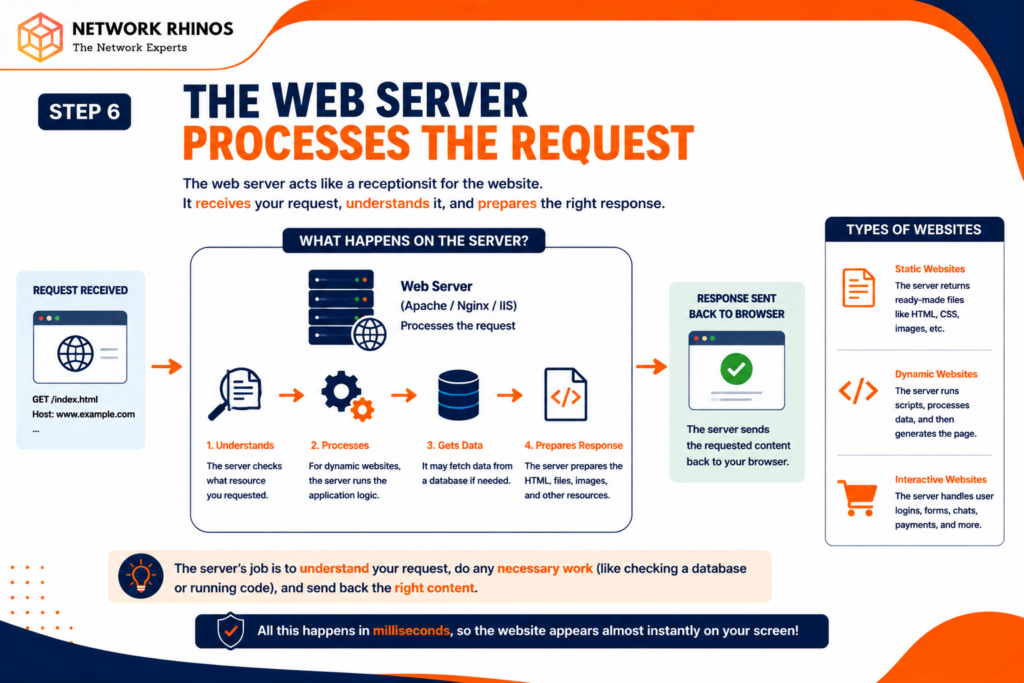
The web server acts as the website’s receptionist.
Popular web servers include:
- Apache
- Nginx
- Microsoft IIS
The server determines what content the user is requesting.
For a simple website, it may immediately return a ready-made HTML page.
For dynamic websites, additional steps may occur:
- User authentication
- Database queries
- Application processing
- Content generation
Modern websites often perform hundreds of operations before sending the final page back to the user.
Step 7: Databases May Be Involved
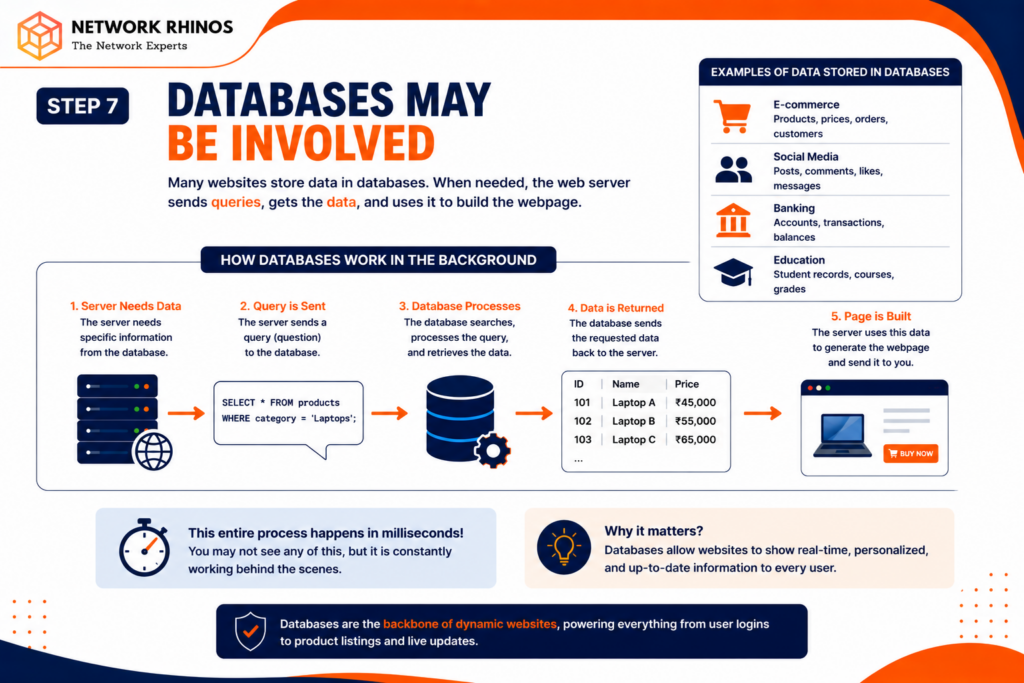
Many websites store information in databases.
For example:
- E-commerce websites store product information.
- Social media platforms store posts and comments.
- Banking websites store account details.
- Educational portals store student records.
When needed, the server sends queries to a database.
The database retrieves the requested information and sends it back to the server.
The server then prepares the webpage using that data.
This entire process often takes milliseconds.
Step 8: The Server Sends a Response
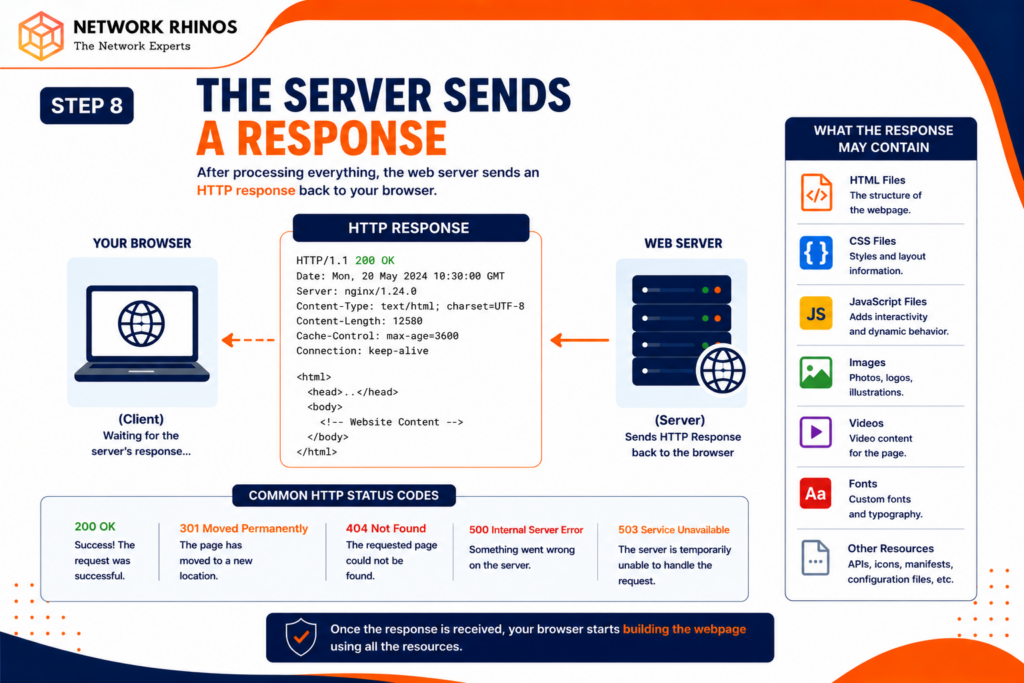
After processing everything, the server sends an HTTP response back to the browser.
The response typically contains:
- HTML files
- CSS files
- JavaScript files
- Images
- Videos
- Fonts
The browser receives these resources and starts building the webpage.
At this stage, the website may still look incomplete because additional resources are being downloaded.
Step 9: The Browser Renders the Page
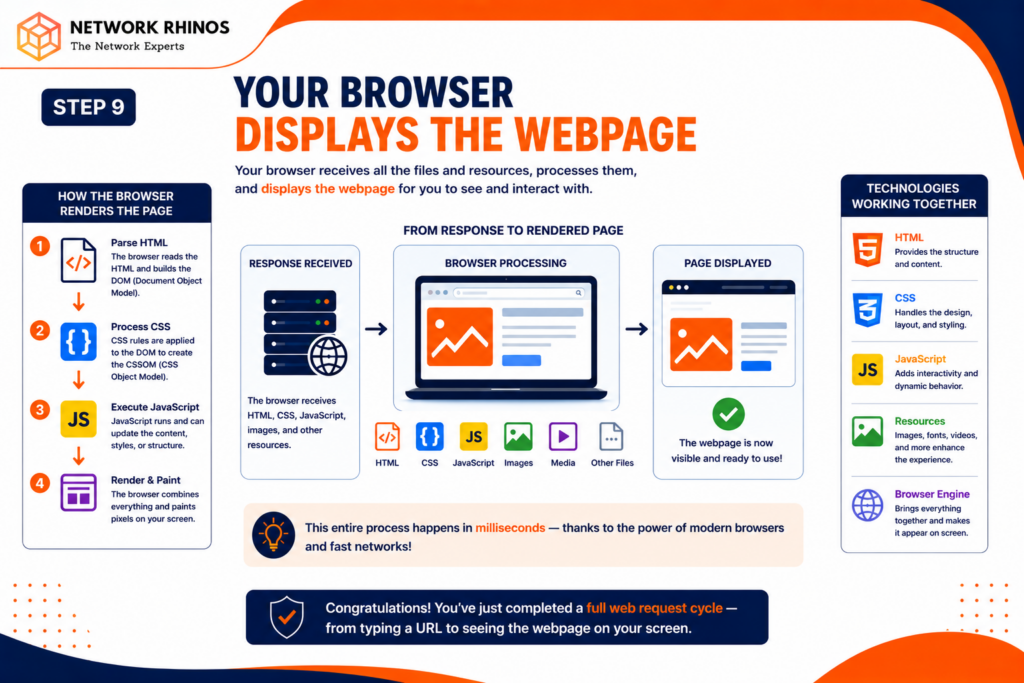
Now comes the visual part.
The browser reads the HTML document and begins creating the webpage structure.
It then:
- Applies CSS styling.
- Executes JavaScript code.
- Loads images.
- Loads videos.
- Downloads fonts.
As each resource arrives, the browser updates what you see on the screen.
This is why some websites appear gradually instead of loading all at once.
Step 10: Additional Requests Continue
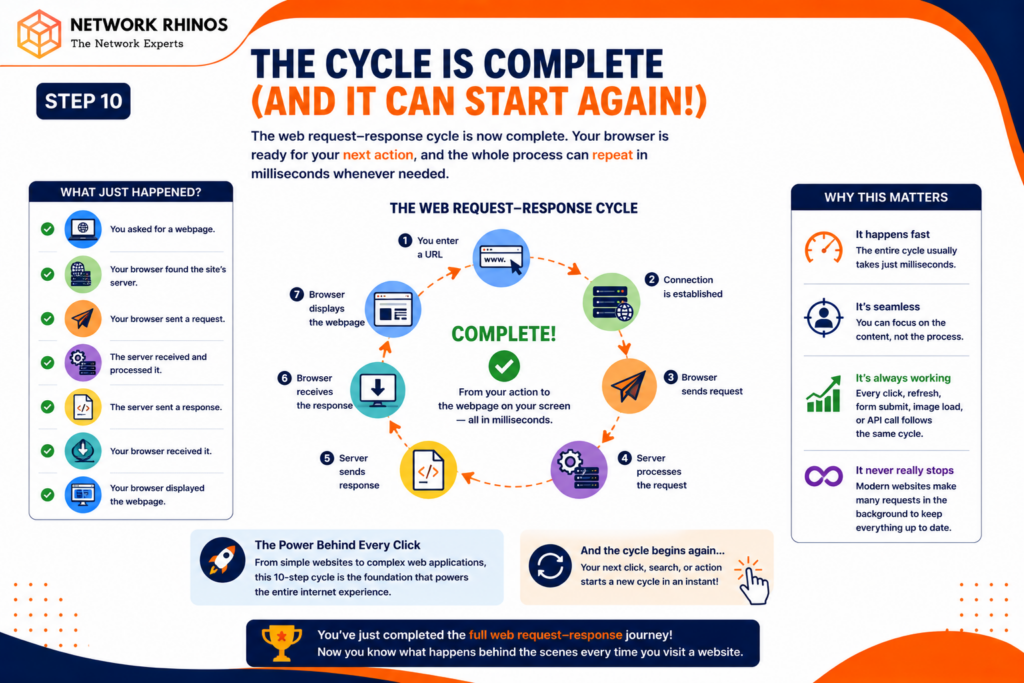
Many people think the process ends after the homepage appears.
Actually, dozens or even hundreds of additional requests may continue in the background.
These requests can fetch:
- Advertisements
- Analytics data
- User profile information
- Notifications
- Chat messages
- Recommended content
Modern websites are much more interactive than traditional webpages, which is why they often require many background communications.
Why Website Loading Speed Matters?
A delay of just a few seconds can cause visitors to leave a website.
Website speed affects:
- User experience
- Search engine rankings
- Sales conversions
- Customer satisfaction
Factors that influence website performance include:
- Server quality
- Internet speed
- DNS performance
- Website design
- Image optimization
- Network latency
This is why businesses invest heavily in improving website performance.
How Networking Knowledge Helps?
Many people use websites every day but do not understand how data travels across the internet.
Learning networking concepts helps students:
- Troubleshoot connectivity issues
- Understand internet infrastructure
- Configure routers and switches
- Improve network security
- Build careers in IT networking
Topics such as DNS, TCP/IP, routing, switching, and web communication are core concepts taught in networking courses.
For anyone interested in becoming a network engineer, understanding the website loading process is a great starting point.
Common Misconceptions About Website Loading
Here are a few myths many beginners believe:
Myth 1: The Browser Directly Knows the Website Location
Reality: DNS must first find the correct IP address.
Myth 2: Websites Load From One Server
Reality: Modern websites often use multiple servers, databases, and content delivery networks.
Myth 3: Loading Happens Instantly
Reality: Several networking and security processes occur before a webpage appears.
Myth 4: Internet Communication Is Always Secure
Reality: Security depends on proper encryption and HTTPS implementation.
Conclusion
Opening a website may seem simple, but an incredible amount of technology works behind the scenes in just a few seconds. First, DNS translates the website name into an IP address. Then a secure connection is established, requests are sent, servers process data, databases provide information, and finally the browser builds the webpage you see.
Understanding what happens when you open a website gives you a deeper appreciation for how the internet works. More importantly, it helps build strong networking fundamentals that are essential for anyone pursuing a career in IT.
If you’re interested in learning more about networking, protocols, DNS, routing, and internet communication, enrolling in a CCNA certification can help you develop the practical skills needed to understand and manage modern networks confidently.
The next time a website loads in front of you, you’ll know that hundreds of networking operations may have already taken place behind the scenes all within a matter of seconds.